Best T-Square For Layout Work (2026)

About the author
The one-line mistake that wrecks a layout
You set a baseline, strike a line, and everything looks fine—until you fit the part and realize the line isn’t square to your reference edge. Then the cut is off, holes don’t line up, or a cabinet face looks “almost right” forever.
That’s where a T-square earns its keep: fast 90° layout from a known edge, repeatable marks, and less fiddling than a framing square on small work. Plus, a good one helps you hold the line steady while you scribe, knife, or pencil.
If you’re looking for the best T-square for layout work in 2026, you’re in the right place. This guide covers woodworking, DIY, cabinet installs, and shop fixtures.
Disclosure: As an Amazon Associate, ToolLayout may earn from qualifying purchases. This doesn’t change what we recommend.
Quick overview: what this guide helps you do
This page compares 5 proven styles of T-squares for layout work, focused on real shop use. In particular, we’re looking for tools that help you work faster and keep lines repeatable.
- Fast square lines from an edge on plywood, MDF, and boards
- Repeatable marking for cabinet parts and batch cuts
- Better control for scribing/knifing without the tool slipping
If you want to browse other square types first, start at Squares hub
Best T-square for layout work (2026): Top 5 Picks
| Image | Product | Best for | Key feature | View on Amazon |
|---|---|---|---|---|
 | Kreg KMA4500 Multi-Mark Layout Tool | Fast, repeatable 90° layout on sheet goods and boards | Large fence registers on an edge for quick square lines and marks | View on Amazon |
 | Swanson Tool TS149 16-Inch T-Square | Everyday layout work for beginners (simple and familiar) | Classic T-head design that’s easy to register and read | View on Amazon |
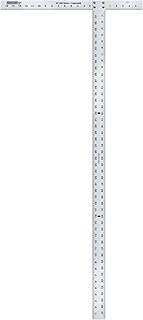 | Johnson Level & Tool 40-0921 Drywall T-Square (48″) | Long layout lines on sheet goods (rips/crosscuts) | 48″ (1219 mm) blade for big panels and full-width marks | View on Amazon |
 | Empire Level 410 48-Inch Drywall T-Square | Rugged jobsite layout work on drywall and panels | Thick, stiff blade that stays straighter under handling | View on Amazon |
 | Alvin 280C 24-Inch Professional T-Square | Cleaner, more controlled marking on smaller layout work | Drafting-style straightedge for crisp pencil/knife guidance | View on Amazon |
1) Kreg KMA4500 Multi-Mark Layout Tool — Best overall for layout work (most DIY + woodworking)
A shop-friendly T-square style tool that registers quickly, stays put, and makes repeat marks easier.
Watch for: keep the fence tight to your reference edge, because most “out of square” lines start with a tiny gap.
Best for: fast 90° layout on plywood, MDF, and cabinet parts
What you’ll like: wide registration surface that reduces slipping while you mark
🧐 Quick verdict: The most useful all-around option for quick, repeatable square layout from an edge.
| Pros ✅ | Cons ⚠️ |
|---|---|
| ✅ Fast edge registration for consistent square lines | ⚠️ Not a “giant” drywall T-square for full 4′ panel layout |
| ✅ Easy to repeat marks without re-measuring as much | |
| ✅ Beginner-friendly feel (less slipping during marking) |
Why it’s a top pick: For layout work, the win is firm edge registration without rocking while you draw. This style is quick to place, easy to control, and fast to repeat across a stack of parts.
Decision bullets
- Where it shines: cabinet sides, face-frame parts, shelves, shop jigs, and general DIY layout where you want a quick 90° line.
- How it stays square: a broad fence references your board edge, so keep the fence seated tight while marking.
- Marking control: good “hand feel” for pencil and knife lines because it’s easy to hold down without shifting.
- Repeatability: great for batch work—mark the same offset on multiple parts without rebuilding the setup each time.
- Best for: Most people who want a practical T-square for layout work for beginners through intermediate shop use.
Shop tip: If your “reference edge” is rough-sawn or dinged up, joint/trim it first. A T-square is only as good as the edge you register against.
2) Swanson Tool TS149 16-Inch T-Square — Best for everyday layout work (simple + beginner-friendly)
A straightforward T-square that’s easy to grab, register, and mark with—so there’s no learning curve.
Watch for: keep the head tight to the edge; don’t “float” it while drawing longer lines.
Best for: quick square lines and short layout marks on boards
What you’ll like: classic shape that’s easy to read and easy to store
🧐 Quick verdict: A solid, simple T-square for layout work when you want something familiar and easy to use.
| Pros ✅ | Cons ⚠️ |
|---|---|
| ✅ Quick and intuitive for basic square layout | ⚠️ Shorter reach than 24″–48″ T-squares on sheet goods |
| ✅ Easy to carry and store in a small shop | |
| ✅ Good “starter” pick for homeowners and DIYers |
If you’re learning layout basics, a standard T-square can be the cleanest way to build good habits. Register from one edge, hold the head tight, and draw the line in one controlled pass.
Why it’s a top pick: It’s simple enough that you’ll actually use it. And for layout work, “used correctly every time” beats “fancy but left in a drawer.”
Decision bullets
- Best use case: small furniture parts, trim layout, quick squaring on boards, and shop fixtures.
- Technique: press the head into the edge with your off-hand while you draw with the other. Then keep your grip steady to avoid drift.
- When it’s not the right tool: full 4′ sheet work—go 48″ (1219 mm) if you want long, single-pass lines.
- Best for: T-square for layout work for beginners and general home shop tasks.
3) Johnson Level & Tool 40-0921 Drywall T-Square (48″) — Best for long layout lines on sheet goods
The right style when you need long, straight, square layout lines across sheet goods.
Watch for: support the sheet so it doesn’t sag, because panel flex can make a straightedge “lie.”
Best for: breaking down plywood and marking full-width crosscuts
What you’ll like: 48″ (1219 mm) reach for single-pass lines
🧐 Quick verdict: Best “big” T-square for sheet-good layout when you want long, square marks without juggling a framing square.
| Pros ✅ | Cons ⚠️ |
|---|---|
| ✅ Long reach for full-width panel layout | ⚠️ Awkward to store in a small shop |
| ✅ Fast to register off an edge for square crosscut lines | |
| ✅ Great for plywood, drywall, and large panels |
If you regularly break down plywood, a 48″ T-square is one of the quickest ways to mark a square crosscut line. Set the head against the factory edge, mark once, and move on.
Why it’s a top pick: Length matters. A short square can be accurate, but it’s still inconvenient when you need a long, straight line across a panel.
Decision bullets
- Best use case: plywood layout, drywall layout, and any time you want a long square line from an edge.
- How it stays square: the head registers against the sheet edge, so keep consistent pressure into the edge while you mark.
- Workholding reality: support sheet goods on foam or a flat bench. If the panel bows, your line can wander when you follow it with a saw.
- Best for: Long layout work where speed and reach matter more than compact storage.
Sheet-good tip: If you’re marking cut lines for a track saw or circular saw guide, mark two points and then connect them with the T-square edge. That way, you reduce the chance of a “crooked connect-the-dots.”
4) Empire Level 410 48-Inch Drywall T-Square — Best rugged jobsite T-square for layout work
A tougher 48″ (1219 mm) T-square style tool for real handling—good when tools get leaned on and moved fast.
Watch for: check it occasionally on a known straight edge, because long tools can get knocked out of true if abused.
Best for: jobsite layout on drywall, plywood, and panels
What you’ll like: stiffer blade feel for long marks without “flop”
🧐 Quick verdict: Best when you want a long T-square that feels more rigid for fast layout work on large material.
| Pros ✅ | Cons ⚠️ |
|---|---|
| ✅ Stiffer feel for long layout lines | ⚠️ Large size takes wall space to store |
| ✅ Quick registration for repeated panel marks | ⚠️ Overkill if you mostly work on small parts |
| ✅ Great for jobsite and garage-shop use |
If your T-square lives in a garage, gets tossed in a truck, or shares space with ladders and sheet goods, ruggedness matters. Long blades bend when they’re stored poorly or used like a pry bar, so a sturdier feel helps from day one.
Why it’s a top pick: For big layout work, a rigid tool is easier to keep flat and easier to hold steady while you mark.
Decision bullets
- Best use case: drywall layout, plywood breakdown, and repeated square marks on panels.
- How it stays square: keep the head seated to the edge and keep the blade flat to the face. Don’t let it “bridge” over debris.
- Storage tip: hang it flat or store it where the blade can’t be bowed. Long tools hate being wedged behind stuff.
- Best for: Jobsite-style layout work where the tool gets handled hard.
Learn the technique: how to choose a T-square for layout work
5) Alvin 280C 24-Inch Professional T-Square — Best for clean, controlled marking (drafting-style)
A drafting-style T-square that works well as a straightedge for crisp lines and careful layout.
Watch for: keep the edge clean, because dust under a straightedge can lift it and shift your line.
Best for: controlled pencil/knife lines on smaller panels and parts
What you’ll like: steady straightedge feel for clean, consistent marks
🧐 Quick verdict: Best when your priority is clean marking control more than jobsite toughness.
| Pros ✅ | Cons ⚠️ |
|---|---|
| ✅ Very good straightedge feel for crisp layout lines | ⚠️ Not the best choice for rough handling or heavy sheet-good breakdown |
| ✅ Nice middle length (24″ / 610 mm) for bench work | ⚠️ Needs a reasonably flat reference surface |
| ✅ Great for careful shop layout and templates |
This is the style you pick when you care about the line itself—clean, controlled, and easy to follow with a knife or pencil. For bench layout, a 24″ (610 mm) T-square is a sweet spot: long enough to guide a cut line, but still easy to handle.
Why it’s a top pick: For templates, patterns, and careful shop work, a drafting-style straightedge is often easier to control than a bulky jobsite square.
Decision bullets
- Best use case: templates, careful layout on smaller panels, and clean straightedge work on the bench.
- How it stays square: register the head firmly to your reference edge; don’t let the head ride on a chip or knot.
- Marking technique: for knife lines, take two light passes instead of one heavy pass, so you reduce slipping.
- Best for: Controlled layout work where line quality and handling matter.
If you’re deciding between a T-square and an adjustable square for furniture layout, see: how to choose an adjustable square for woodworking and Best Adjustable Square For Woodworking.
How we choose
To recommend a T-square that actually helps in a home shop, we focus on what changes results. In other words, we look at what keeps your marks accurate and repeatable.
- Registration quality (does the head/fence sit tight to an edge?)
- Blade stiffness (less flex = straighter, easier lines)
- Readability (marks you can see without twisting your head)
- Handling and control (does it slip while you mark?)
- Real-world use cases (sheet goods, bench parts, templates, jobsite abuse)
Don’t buy the wrong T-square
Don’t buy this if…
- You need a tool for checking inside corners or transferring measurements like a combination square does. A T-square is mainly an edge-registered layout tool.
- You plan to do mostly 3D joinery layout (tenons, shoulders, depth lines). You’ll usually be happier with a combination square or adjustable square.
- You won’t protect the tool. Long T-squares stored bent or wedged behind sheet goods can lose accuracy.
Buy this if…
- You want fast square lines from an edge on plywood, MDF, drywall, and boards—without juggling a framing square.
- You do repeat layout work (multiple shelves, cabinet parts, batch cuts) and want consistent marks.
- You want a T-square for layout work for beginners that reduces “how did my line drift?” moments.
Buyer’s guide: how to choose a T-square for layout work that stays accurate
Two main styles (and why it matters)
Most T-squares you’ll see for shop use fall into two camps. The right choice depends on what you mark most often.
- Drywall / sheet-good T-squares (48″ / 1219 mm)
Built for long lines and fast panel layout. Great reach, but they take space and don’t love being stored poorly. - Bench / drafting-style T-squares (16″–24″ / 406–610 mm)
Better handling on smaller parts and templates. Easier to store and control for careful marking.
If you want a step-by-step selection flow, see the T-square for layout work buying guide: how to choose a T-square for layout work
What “accurate” really means (registration beats everything)
A T-square can have a straight blade and still give you bad layout if registration is sloppy. In practice, accuracy comes from how the tool sits on the work.
- A head/fence that sits tight to the reference edge
- A blade that stays flat on the work (no rocking on chips or debris)
- A marking technique that doesn’t push the tool away while you draw
Quick accuracy check (2 minutes)
- Register the head against a straight board edge and draw a line.
- Flip the T-square over (mirror it) and register on the same edge at the same spot.
- If the new line diverges, either the edge isn’t straight or the tool is out of square. Confirm with a known straight edge/square before blaming the T-square.
Length choice: 16″, 24″, or 48″?
Pick length based on what you actually mark. That way, you get the reach you need without fighting storage and handling.
- 16″ (406 mm): small parts, quick square marks, easy storage.
- 24″ (610 mm): bench layout sweet spot for furniture parts and templates.
- 48″ (1219 mm): sheet goods and full-width panel lines.
If you do both sheet goods and bench work, many shops end up with two: a 48″ for panels and a 16″–24″ for everything else.
Marking: pencil vs knife line (and why it changes tool choice)
For rough carpentry, a pencil line is fine. But for woodworking joinery and clean shoulders, a knife line is often easier to place precisely.
- Pencil: prioritize readability and speed.
- Knife: prioritize a straightedge you can hold down firmly without slipping.
If you find yourself doing more joinery layout than sheet layout, you may be better served by an adjustable square: Best Adjustable Square For Woodworking.
Clamping & workholding (the real secret)
Layout accuracy is mostly about keeping things from moving. So before you blame the tool, lock down the work and clear the surface.
- Hold the workpiece so it can’t slide while you mark.
- Press the head/fence into the edge with steady pressure.
- Brush away chips and dust before you register the blade.
If you want the full selection checklist, this is the dedicated T-square for layout work buying guide: how to choose a T-square for layout work
Sizing & compatibility checks (what it needs to work well)
Before you buy, check these. They prevent the “it doesn’t fit my workflow” headache later.
- Your common material size: boards vs 2’–4′ panels.
- Your storage space: 48″ tools need a safe home to stay straight.
- Your marking method: pencil-only vs knife + scribe.
- Your reference edge quality: if edges are rough, you’ll need to true them or use a different reference method.
If you’re cross-shopping squares for furniture work, this helps too: how to choose an adjustable square for woodworking
Troubleshooting table: problem → cause → fix
| Problem you see | Likely cause | Fix that works in a real shop |
|---|---|---|
| Your “square” line is off when you measure diagonals | Head wasn’t seated tight to the reference edge | Press the head into the edge with steady pressure; re-mark with one clean pass |
| Line starts square but drifts as you draw | You pushed sideways on the blade while marking | Hold the tool down with your off-hand; take two lighter passes instead of one heavy pass |
| The tool rocks and your line wobbles | Dust/chips under the blade; bowed panel | Brush the surface; support the work flat (especially sheet goods) |
| Long lines aren’t straight | Blade flex or poor support | Use a stiffer/longer T-square for sheet goods; support the panel and keep the blade flat |
| Marks don’t repeat consistently | Referencing from different edges/faces | Pick one reference edge/face and stick to it for the whole batch |
| T-square seems “out of square” suddenly | Tool got bent or stored poorly | Check against a known square/straight edge; store it flat or hanging, not wedged |
| Knife line slips off the edge | Too much pressure on the first pass | Take a light first pass to establish the track, then deepen the line |
| Sheet-good layout is slow and awkward | T-square is too short | Move up to a 48″ (1219 mm) drywall T-square for full-width lines |
For a deeper checklist and examples: how to choose a T-square for layout work
Common mistakes and quick wins (shop-pro tips)
Quick wins that instantly improve layout accuracy
- Clean the edge and face before you register the head and blade.
- Use one reference edge for the whole batch of parts.
- Mark with light passes instead of one heavy “shove the pencil” pass.
- Support sheet goods so the panel stays flat while you mark.
Common mistakes
- Registering on a rough, damaged, or bowed edge and expecting perfect layout.
- Letting the head “float” while you draw—tiny gaps become big errors.
- Storing a long T-square where it can bow (behind sheet goods, under clamps, wedged in a corner).
If you want a clean selection walkthrough, use this: how to choose a T-square for layout work
FAQs
1) What’s the best T-square for layout work?
For most DIY and woodworking, the best all-around pick is an edge-registering layout T-square that’s quick to place and hard to slip. That way, you can make repeat marks on boards and panels without constantly re-checking your setup.
2) Is a drywall T-square good for woodworking?
Yes—especially for sheet goods. A 48″ (1219 mm) drywall T-square is excellent for fast, square panel layout. However, for smaller furniture parts and templates, a 16″–24″ (406–610 mm) bench/drafting-style T-square is usually easier to handle.
3) Do I need a 16″, 24″, or 48″ T-square?
Choose by what you mark most: 16″ (406 mm) for small parts, 24″ (610 mm) for bench layout, and 48″ (1219 mm) for sheet goods. If you do both, two sizes often make sense.
4) Why are my lines not square even with a T-square?
Most often, the head wasn’t seated tight to the reference edge, the workpiece moved, or debris lifted the blade. Clean the surface, clamp the work if needed, and keep firm pressure into the edge while you mark.
5) Is a T-square better than a framing square for layout?
For many small-to-medium layout tasks, yes, because a T-square registers quickly from an edge and is easier to hold steady while you draw. A framing square is still useful for larger carpentry layout and checking bigger assemblies.
6) Can I use a T-square for marking cut lines on plywood?
Yes. That’s one of its best uses. A 48″ (1219 mm) drywall T-square is especially handy for full-width crosscut lines on sheet goods.
7) What’s the best marking method with a T-square?
Start with a light pass to establish the line, then darken it. For knife lines, take two light passes rather than one heavy pass to reduce slipping.
8) Should a beginner buy a T-square or an adjustable square?
If your work is mostly panel and edge-referenced layout, a T-square is fast and beginner-friendly. But if you’re doing joinery layout and checking depth/shoulders, an adjustable square is often more versatile: Best Adjustable Square For Woodworking.
9) How do I keep a long T-square accurate?
Store it flat or hanging so the blade can’t bow. Don’t wedge it behind sheet goods. Also, re-check it occasionally against a known square/straight edge—especially after jobsite use.
Conclusion: which T-square should you buy?
If you want the most useful “first” option for general shop marking, start with the edge-registering layout tool (Pick #1). It’s quick, repeatable, and easy to control.
If you want a simple, classic tool for basic marks, Pick #2 is the straightforward everyday choice.
For sheet goods and long crosscut layout lines, go 48″ (1219 mm) with Pick #3 or Pick #4—Pick #4 is the tougher-feeling jobsite option.
And if you want cleaner, more controlled straightedge marking on the bench, Pick #5 is a great drafting-style choice.
For the full selection checklist and sizing help, use the T-square for layout work buying guide: how to choose a T-square for layout work